
Tecum Help
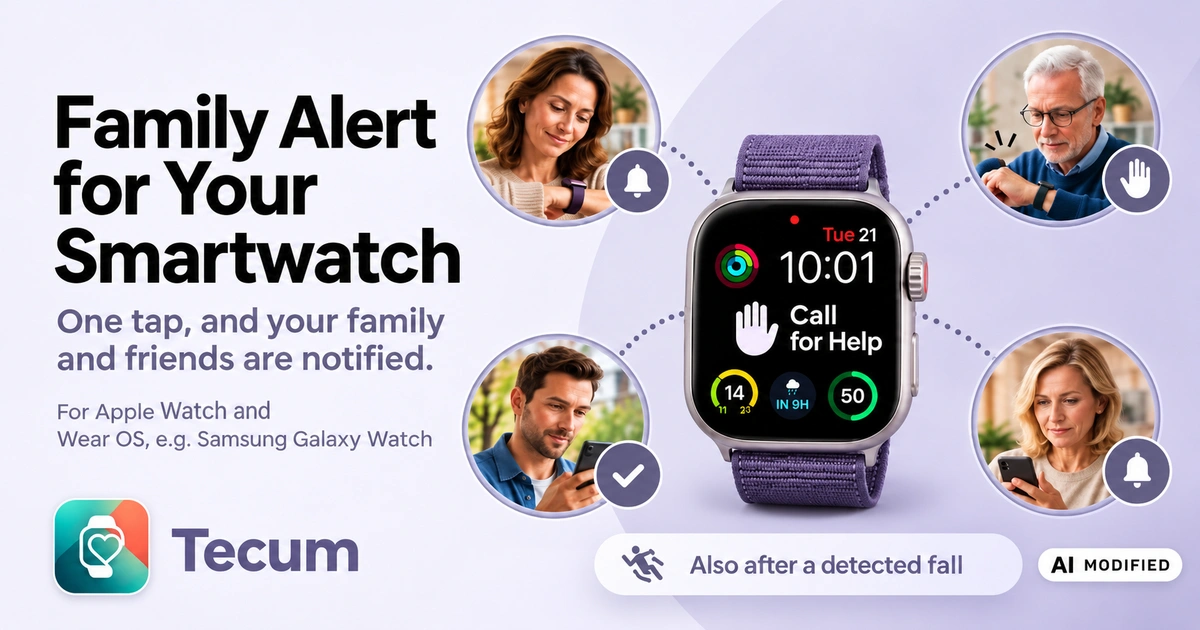
With Tecum, you can ask family and friends for help from your smartphone or a smartwatch (Apple Watch, Samsung Galaxy Watch, or another compatible smartwatch). Everyone is notified at the same time and can see who is taking care of it and who can't help right now.
Who is Tecum for?
Perhaps you sometimes worry about someone close to you who lives on their own and is still very active.
Or perhaps you like to be out and about yourself, running errands, meeting friends, going for walks, and still going strong. Then you may know the thought: What if something happens one day and nobody is nearby?
Tecum is for people who want to stay independent and active – and for family and friends who want to be there for each other at the right moment. If you are looking for a solution for an older family member, you don't need a special senior watch or an alert bracelet. Tecum works with a compatible Apple Watch or a smartwatch with Wear OS, such as the Samsung Galaxy Watch.
What is Tecum?
Tecum is not an SOS watch, a senior watch, or a stand-alone home alert system. Tecum is software, with apps for Apple and Android. Tecum connects your smartphone and a smartwatch (Apple Watch, Samsung Galaxy Watch, or another smartwatch with Wear OS) with the people you trust.
If your smartwatch has fall detection, we recommend that you turn it on in the settings and allow the Tecum app to use your precise location. If a fall is then detected, the smartwatch asks whether you need help. If you confirm, or if you do not respond, Tecum notifies your contact persons.
The Tecum app has a Help button, and you can add the Help button to your watch face yourself (as a so-called complication).
Your smartphone and smartwatch show you who is taking over and also announce it aloud. You can still use the phone function as usual, including supported voice commands such as “Hey Siri, call Anna” or “Hey Google, call Anna”.
It doesn't matter whether you already own a smartwatch or are planning to get one. You can also use Tecum without a smartwatch, with just our app on your smartphone – but we recommend using a smartwatch.
Tecum comes from Latin and roughly means “with you”. That is exactly the idea: when someone needs help, the people close to them should know about it.
Tecum does not replace Apple's Emergency SOS or an equivalent function of your device, nor the European emergency number 112 (144 in Austria and Switzerland, 15 in France). If you need an ambulance or other rescue services, calling 112 (144 in Austria and Switzerland, 15 in France) is still the right way.
How does Tecum help?
When you need help, it matters to hear a familiar voice as soon as possible. That's why Tecum doesn't try to reach one contact person after another. All selected contact persons are notified at the same time.
Whoever can help at that moment answers “I’ll take care of it and call” and can call the person receiving support directly. The other contact persons see right away that someone is already taking care of it. That way everyone knows what's going on – and someone familiar gets in touch as soon as possible.
If a contact person can't help at that moment, they answer “I can't right now”. The other contact persons are still notified and can take over.
Contact persons can receive the notification in the Tecum app on their smartphone and smartwatch or – even without any app – by e-mail.
My smartwatch can already do that – why Tecum?
Yes, that's partly true. The Apple Watch and the Samsung Galaxy Watch have emergency-call functions and can contact the rescue services when they detect a fall. Saved emergency contacts can also be notified and receive your location.
That is important and right. When professional help is needed, the rescue services are the first place to turn.
But anyone who has fallen, suddenly feels unwell, or can't get up on their own often wishes for one thing above all: someone familiar from their family or circle of friends by their side.
That's exactly where Tecum comes in.
- You are not alone: Your family and friends learn about your call for help at the same time. Nobody has to go through a phone chain first.
- A familiar voice: A contact person takes over your call for help and can call you directly. You hear someone you know.
- You know who is coming: Tecum shows you who is taking over and also tells you out loud. That way you stay informed even if you can't read the screen at that moment.
- Family and friends as a team: Your contact persons see who is taking care of it and who can't help right now. Everyone is in the loop.
- Finding you quickly: If your location is available, your contact persons see on a map where you are and can get directions to you.
- Getting through the front door, too: What good is it if someone is standing at your door but doesn't know the code for your key box? Tecum shows the access code you stored to the contact person who took over your call for help. That way they can get to you even if you can't open the door yourself.
- Tecum reminds your contact persons: If nobody takes over at first, your contact persons are notified again.
- For the small moments, too: Not every situation calls for an ambulance. With Tecum, you ask the people you trust for help.
- Peace of mind for the family: Your loved ones know that they will be notified when you call for help and can respond together.
Tecum does not replace the emergency-call function of your smartwatch. It adds something personal: the connection to people you trust.
What roles are there in Tecum?
Tecum has three roles. One person can have more than one role.
Person receiving support
The person receiving support can use Tecum to get help – on the smartphone or smartwatch, manually or after a detected fall. They can manage their contact persons themselves and so also take on the role of an organizer.
Organizer
An organizer manages Tecum for a person receiving support, especially their contact persons. The organizer can invite and remove contact persons and sees who has accepted. An organizer can also be a contact person and so also receive calls for help. An organizer can also be the organizer for several people receiving support.
The section “What an Organizer Can Do” explains in detail which features are available to an organizer.
Contact person
Contact persons are notified when the person receiving support needs help. They can take over the call for help and call the person receiving support, or let others know that they can't help right now.
Benefits of Tecum
- On the go, not just at home: Tecum works wherever the smartwatch has a connection, not only within your own four walls. With a compatible smartwatch with cellular (LTE) and a suitable plan, the call for help works even without a smartphone nearby; otherwise, the smartwatch uses Wi-Fi or its connection to the smartphone.
- A smartwatch you like: Instead of a special SOS watch, you choose a modern smartwatch, for example an Apple Watch or Samsung Galaxy Watch.
- No call chain: Some SOS watches rely on a call chain in which contact persons are called one after another. If voicemail answers, the call for help goes nowhere. With Tecum, this risk doesn't exist.
- Everyone at once instead of a call chain: All selected contact persons learn about the call for help at the same time.
- One takes over, everyone knows: As soon as someone takes care of it, the other contact persons see it, and so does the person who called for help.
- Flexibility for contact persons: They can receive the notification in the Tecum app on their smartphone, or on their Apple Watch or Android smartwatch. Or they can skip installing an app altogether and be notified by e-mail.
- No special hardware from Tecum: Tecum consists of apps and a web portal; no additional alert device is needed.
Tecum in Detail
Technology and Availability
Tecum is available for Apple and for Android: an app for the smartphone and an app for the smartwatch on each. The apps are available on the Apple App Store and on Google Play.

Release expected
in the next few days
For Tecum you need:
- the Tecum app on the smartphone or smartwatch of the person receiving support, that is, the person who uses the call-for-help feature.
- optionally, a compatible smartwatch: the Apple Watch, the Samsung Galaxy Watch, or another smartwatch with Wear OS 3 or later.
- for calls for help on the go without a smartphone, a smartwatch with cellular (LTE) and a suitable cellular plan. Without cellular, the smartwatch uses Wi-Fi or the connection of the paired smartphone.
- contact persons who have agreed to help.
Fall detection depends on the model and operating system of the smartwatch. On the Apple Watch (Series 4 and later), the smartwatch itself asks after a hard fall whether help is needed; the feature must be turned on in the smartwatch settings. On the Samsung Galaxy Watch, the smartwatch reports the fall and the Tecum app asks the question. In addition, the Tecum app on the smartwatch has a button the person can use to ask for help themselves.
The person can also get help from the smartphone or in the Tecum Portal – even without a smartwatch.
Free Use
Tecum is currently free. CERTENTIC GmbH may end the free offer at any time, discontinue the service, or offer to continue it as a subscription. We will let you know by e-mail at least 14 days in advance. If a subscription is offered, that e-mail will include the offer.
Would you like to use Tecum? Get access to Tecum
Who is CERTENTIC?
Tecum is a product of CERTENTIC GmbH, based in Nettetal (Germany) with a branch in Vienna (Austria). CERTENTIC was founded in 2015 with a product idea meant to improve consumer protection. CERTENTIC offers consulting and development services to business customers. The company also develops its own consumer applications, such as CERTENTIC Vote for online voting and CERTENTIC Bridge, which connects iCloud data with AI assistants. With Tecum, it is creating an app that lets family members know when someone needs help.
Contact Persons: With or Without the App
A contact person is notified when the person receiving support needs help. They can use Tecum with or without the smartphone app.
Without the app:
- The contact person receives an e-mail with a link.
- The link opens the call-for-help page with the location, a map, and directions, as well as the buttons “I’ll take care of it and call” and “I can't right now”.
- After signing in with their e-mail address, the Tecum Portal shows an overview of the people receiving support and the calls for help.
With the app, you also get:
- The notification appears right on the smartphone and on the smartwatch connected to it.
- The contact person can respond directly from the notification.
- The map, directions, and a call to the person are just a tap away in the app.
- The overview of the people receiving support and the calls for help is right at hand.
- E-mails then become optional; you can choose this in the settings.
A contact person can step down at any time: in the overview, they choose “Step down as contact person” in the menu next to the person receiving support. After that, they no longer receive calls for help and are no longer shown as a contact person; the organizers and the person receiving support receive an e-mail.
Even as a contact person, I can invite someone as a person receiving support from my Tecum overview. I can also enable myself as a person receiving support and so get the Get help button in the app and in the portal.
What happens when the Help button is pressed?
Here's what happens when someone asks for help:
- The person presses the Help button: in the Tecum app on the smartwatch, on the watch face, on the smartphone, or in the portal. A short confirmation prevents a call for help from being sent by accident.
- All contact persons are notified at the same time. If the location is known, they can see it in the call for help.
- A contact person answers with “I’ll take care of it and call” and calls the person. Everyone else sees who is taking care of it, and there are no further reminders. The person also sees who is taking care of it.
- If a contact person can't help at that moment, they say so with “I can't right now”; the others are still notified.
- If nobody takes over, Tecum reminds the contact persons after a few minutes. After a set time (currently two hours), the call for help expires. The person sees that nobody took care of it and can call for help again.
The Help button is also available as a widget on the smartphone's home screen (iPhone and Android, and on the iPhone also on the lock screen). After you confirm, it sends the same call for help as the Help button in the Tecum app. You can find more under “Frequently Asked Questions”.
The smartwatch and smartphone announce aloud that a call for help has been sent. They also announce when a contact person can't help right now and who is taking care of it. That way the person stays informed even if they can't read the screen. For this, the Tecum app needs to stay open.
Tecum puts you in touch. If you need an ambulance or other rescue services, please call 112 (144 in Austria and Switzerland, 15 in France).
What happens after a fall?
The fall detection of modern smartwatches can help let loved ones know after a fall. If a compatible Apple Watch or Samsung Galaxy Watch detects a fall (depending on the model and operating system), it first asks whether help is needed. That way nobody is notified unnecessarily. If the person confirms that they need help or doesn't respond, Tecum can notify the selected family members and friends. In this way, Tecum adds direct notification of trusted people to the fall detection of the smartwatch.
- The smartwatch detects a hard fall and asks the person whether they are okay.
- If the person answers that they are fine or that they didn't fall, nobody is notified.
- If they answer that they need help, all contact persons are notified at the same time.
- If they don't answer, for example because they can't, Tecum also notifies all contact persons after a short time. The message then says that there was no response after the fall.
- From then on, everything works as with the Help button: a contact person takes over and calls. If nobody takes over, Tecum reminds the contact persons after a few minutes, and after a set time (currently two hours) the call for help expires.
Apple Watch: The smartwatch asks the question itself. Fall detection is available on Apple Watch Series 4 and later; it must be turned on in the smartwatch settings. The person can answer that they are fine, that they didn't fall, or that they need help.
Samsung Galaxy Watch: The smartwatch reports the fall, and the Tecum app asks the question. The person can answer with “Yes, get help” or “I'm fine”. If there is no answer, Tecum notifies the contact persons after a short time.
Tecum puts you in touch. If you need an ambulance or other rescue services, please call 112 (144 in Austria and Switzerland, 15 in France).
What an Organizer Can Do
Setup is often done by a family member or someone the person trusts (in Tecum, the organizer). The organizer invites the person receiving support and their contact persons and manages the list of contact persons. The person receiving support and each contact person decide for themselves whether to accept the invitation.
An organizer is a family member or trusted person who supports someone who uses Tecum (in Tecum: the person receiving support). An organizer can:
- invite the person receiving support by e-mail and help with the setup,
- invite contact persons and see who has been invited, has accepted, or has declined,
- edit the profile of the person receiving support, for example the name and language,
- disconnect smartwatches connected to the person receiving support,
- see the details of the person receiving support and of the contact persons who have accepted: name, e-mail address, and mobile number, and for the person receiving support also the alternative number, if provided,
- be notified as a contact person themselves when the person receiving support needs help,
- ask a contact person who has accepted to become another organizer; that person decides for themselves whether to take on the role,
- remove contact persons and other organizers from the list, either as organizer, as contact person, or in both roles, and withdraw an open invitation. Before removing someone, Tecum asks for confirmation; the removed person and the person receiving support receive an e-mail,
- find out by e-mail when an invitation has been accepted, declined, or has expired without an answer. Anyone who doesn't answer receives a reminder halfway through the validity period and one day before it expires; you are copied on these reminders,
- step down as organizer if there is at least one other organizer, or step down as contact person if there is another contact person; both are available in the menu next to the person receiving support in the overview. The other organizers and the person receiving support receive an e-mail.
- enable the person receiving support as an organizer as well, so they can manage their contacts themselves; they receive an e-mail about it.
- enable themselves as a person receiving support (in the menu behind “Signed in as …” under “Enable myself as a person receiving support”) to use Tecum themselves as well; no smartwatch is needed for this.
Frequently Asked Questions (FAQ)
Sorry, I couldn't find a matching topic.
About Tecum
Does Tecum cost anything?
Not at the moment: Tecum is currently free. CERTENTIC GmbH may end the free offer at any time, discontinue the service, or offer to continue it as a subscription. We will let you know by e-mail at least 14 days in advance.
How do I get access to Tecum?
Tecum is currently free. Get access to Tecum
How can I stop using Tecum?
You can stop using Tecum yourself at any time. Your user account and your data will then be deleted.
To do so, sign in to Tecum and open https://app.tecumwatch.com/delete-account. There you can see what ending your use means and for whom you will no longer be listed as an organizer or contact person. If you are the only organizer of a person receiving support, you first need to make sure there is another organizer.
If you have an active subscription, please note the rules on cancellation and refunds in Section 13 of our Terms of Use.
Once you confirm, your user account is deleted, the people affected are informed by e-mail, and you are signed out.
Does Tecum replace calling 112?
No. Tecum does not replace Apple's Emergency SOS or an equivalent function of your device, nor the European emergency number 112 (144 in Austria and Switzerland, 15 in France). Tecum puts you in touch with your family and the people you trust. If you need an ambulance or other rescue services, please call 112 (144 in Austria and Switzerland, 15 in France).
Smartwatches and Setup
Which smartwatches work with Tecum?
The Apple Watch, the Samsung Galaxy Watch, or another compatible smartwatch with Wear OS. Tecum does not provide any hardware; you choose the smartwatch you like. Which features are available, for example fall detection, depends on the model and operating system of the smartwatch.
Can I use Tecum without a smartwatch?
Yes. You can then call for help with the button in our smartphone app. However, we recommend using a smartwatch that you wear on your wrist – when you need help, your smartphone may not be within reach.
How do I get the Help button onto my watch face?
You can choose any watch face you like. Pick one that has at least one complication you can set yourself, and place the Help button of the Tecum app there. Then you can reach it with a single tap right from the watch face. On some Wear OS watch faces, the Tecum complication is not available.
Does the Apple Watch work differently from the Samsung Galaxy Watch?
The process is the same on both: the call for help always goes to all contact persons at the same time. After a fall, on the Apple Watch the smartwatch itself asks the question; on the Samsung Galaxy Watch, the Tecum app does.
Calls for Help and Fall Detection
What happens after a fall, and what if I can't respond?
The smartwatch asks whether you need help. If you answer that you are fine, nobody is notified. If you don't answer, Tecum notifies your contact persons after a short time and lets them know that there was no response after the fall. You can find the whole process in the section about falls.
Can I send a call for help right from my smartphone's home screen?
Yes. On the iPhone and on Android smartphones, there is the “Tecum Help” widget. You add it to your home screen, and on the iPhone also to your lock screen, and it shows a red “Call for Help” button. Tapping it first asks you to confirm. The widget then sends the same call for help as the Help button in the Tecum app: all contact persons are notified, and the app opens. As long as the call for help is open, the widget shows the green “All Clear” button; with it, you withdraw the call for help without opening the app. When a contact person takes over the call for help, the widget shows who is taking care of it. If you are not signed in, the widget shows a note about signing in.
What happens if nobody responds?
Tecum reminds the contact persons again after a few minutes. After a set time (currently two hours), the call for help expires. If help is needed urgently, please call 112 (144 in Austria and Switzerland, 15 in France).
Why can't my contacts see my location when I call for help?
Please check whether location access is turned on on your smartwatch.
Apple Watch (watchOS): On the Apple Watch, open Settings → Privacy & Security → Location Services and check that Location Services is turned on. Depending on your watchOS version, you can also see or change the location permissions of individual apps there.
If Tecum doesn't appear in the list: iOS and watchOS often only list an app under location permissions after it has requested the location for the first time. So open Tecum on the Apple Watch and, if needed, trigger a location request. The permission should then appear.
Wear OS (Galaxy Watch): Check two places:
- Settings → Location: Location must be turned on (“On”).
- Settings → Location → App permissions → Tecum: Turn on “Use precise location” and choose “While using the app”.
Why aren't the location and the callback number included in the e-mail about a call for help?
We take privacy personally. That's why we handle your data with care and don't reveal it in e-mails. An e-mail can be forwarded, shown in a preview, or read automatically by security software. For this reason, neither the location nor the callback number of the person receiving support is in the e-mail, and the notification in the app doesn't contain them either. The e-mail contains only a link to the call-for-help page. There, contact persons see the location with a map and directions. Tecum only retrieves the callback number once a contact person takes over with “I’ll take care of it and call”; it does not appear in the text of the page.
Contact Persons and Notifications
Does a contact person need the smartphone app?
No. Without the app, the contact person receives an e-mail with a link to the call-for-help page, which shows the location, a map, and directions, and where they can respond. With the smartphone app, the notification appears right on the smartphone and on the connected smartwatch, and the contact person can respond directly from it.
Do I need to sign in to the smartphone app again to keep receiving notifications?
Yes, you need to sign in again if you change your e-mail address in the portal or if you have signed out of the app. When you change your e-mail address, all sign-ins end, including the one in the smartphone app. Afterwards, sign in once with the code that Tecum sends to your new address. Until then, your smartphone receives no notifications about a call for help; as a contact person, you will still receive the e-mail about the call for help.
Will my smartphone still receive notifications about calls for help if I haven't opened the app in a long time?
Normally, once the Tecum app has not been opened for 100 days, notifications no longer arrive on the smartphone. Notifications about calls for help are then sent by e-mail instead. To keep this from happening, Tecum sends a notification after 90 days without the app being opened, saying: “Please tap this message to open the Tecum app. That way you'll keep receiving notifications when someone calls for help.” Tap this message so that the Tecum app opens.
As a contact person, can I also be notified of a call for help on my smartwatch?
Yes. For this you need an Apple Watch or a smartwatch with Wear OS, for example a Galaxy Watch. It must either be paired with your smartphone via Bluetooth or be connected directly to the internet via cellular (LTE) or Wi-Fi. The Tecum app must also be installed on the smartwatch.
How to connect your smartwatch:
- Open the Tecum app on the smartwatch and choose “Also receive calls for help as a contact person”. The smartwatch shows an eight-digit code.
- Open the Tecum app on your smartphone where you are signed in, and go to Settings → Status of my smartwatch as a contact person.
- Enter the code from the smartwatch there.
- The smartwatch is connected and appears in the list with its status.
The notification on your smartphone and the e-mail stay as they are; the smartwatch is added. You can connect up to three smartwatches and disconnect each one again in the app or on the smartwatch itself.
How can I turn off e-mails about a call for help to me as a contact person if I use the smartphone app or the smartwatch app?
You set this in the Tecum app on your smartphone: in the notification settings, you choose whether you still want to receive an e-mail about a call for help in addition to the app notification. The setting applies to your account, so it also applies when you receive calls for help on a smartwatch.
Two cases remain: as long as notifications are not active on any of your devices, for example because you signed out of the app or turned off notifications in the system settings, you will still receive the e-mail. The same applies if the notification did not arrive on your device: Tecum then sends the e-mail instead.
Legal
How does Tecum handle my data?
With a service like this, trust is everything. That's why we take privacy personally. Part of that is “data minimization”, which means we collect as little data as possible. Nobody becomes a contact person without explicitly agreeing to it: whoever is invited decides for themselves. You share your own mobile number yourself, and only after the invitation. For the invitation, the organizer only needs the e-mail address, name, gender, and language of the person being invited. Organizers and contact persons who have accepted see the name, e-mail address, mobile number, and, if provided, the alternative number of the person receiving support. An invited contact person sees the name, mobile number, and, if provided, the alternative number even before answering, but not the e-mail address. The location is shared only in a call for help. You can find more in the Privacy Policy. How to stop using Tecum and delete the data we store about you is explained under How can I stop using Tecum?.
More information: Privacy Policy · Terms of Use · Imprint